Category: Reviews

  • Astra vs Kadence theme: Which comes out on Top? (2021)

    Astra vs Kadence theme: Which comes out on Top? (2021)

    Confused between Astra and Kadence for your WordPress theme?

    Kadence and Astra are two of the most amazing multipurpose WordPress themes. You can use either one of them to create everything from blogs to business websites, online courses to eCommerce stores, and more.

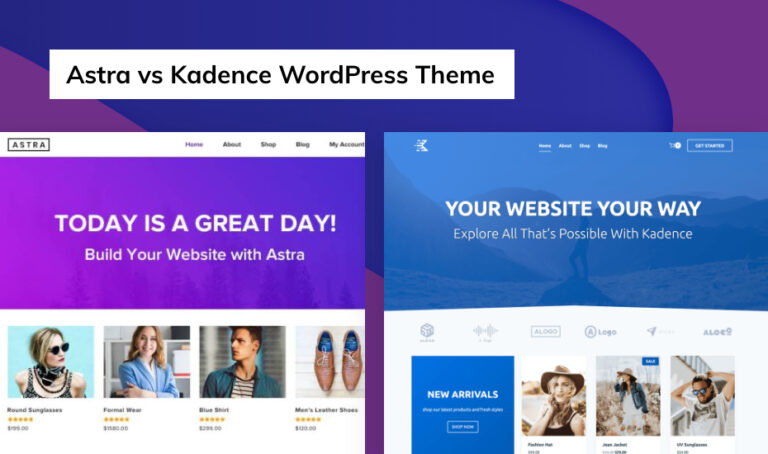
    But while they claim to be superior, both of the themes build the WordPress site in slightly different ways. So you need to pick the one that meets your need. To help you with your decision, we’ve written this in-depth comparison of the Astra vs Kadence theme. We aim to compare the biggest features of Astra and Kadence that makes difference in your decision.
    There’s a lot to cover, so let’s dig in.

    Astra vs Kadence- Starter sites

    Astra vs Kadence- Starter sites

    Looking for options and versatility? Astra’s 66 starter templates are available for free. You are likely to get the one with content and images that match exactly with the need of your website. You have so many options to choose from that you will literally feel confused.  

    On another hand, Kadence has six different starter templates that you can easily import to your site. Although the options are limited, each one of them is well-built and ready to use. Meaning, if you like one of the starter sites, more than half of your work is already done. But it won’t be wrong to say that the options are limited here. 

    Astra vs Kadence- Customization options 

    Astra vs Kadence- Customization options 

    Both themes give you detailed options in the WordPress Customizer to let you control how your site looks. Needless to say, both of the themes have a globally linked pallet, toggle widget areas, and unique header items. What more could one ask for?

    Kadence has many unique customization options and its changes can be previewed in real-time mode- you can edit your site from the frontend. Here, you can customize headers, footers, blog posts, homepage settings; menus, you name it. It has Kadence global color pallet which is pretty revolutionary.

    To customize the Astra theme itself, you can use the real-time WordPress customizer. If you have imported the demo content, you can customize the theme using the editor that you selected. You can do the customization with a WordPress block editor or with the visual drag-and-drop page building. 

    For an example- To add social icon in header, you will need an extra widget with Astra. To be honest, Astra header button is quite limiting. Kadence allows everything including social icon, search, logo and so on. Kadence header is pretty good.

    Among the two, Kadence seems to have more customization options as multiple sections in Kadence is customizable. 

    Astra vs Kadence- Performance 

    Astra vs Kadence theme:  Performance
    Astra vs Kadence theme: Performance

    Let’s start with the big and most important – performance.

    While both of these themes are lightweight, Astra is the most focused to keep the theme light. The page size of Astra is only 36KB. Kadence has been noted to give a good performance. For starters, this theme is 42 KB. This makes Kadence quite lightweight and SEO-friendly. While the Kadence theme comes with tons of awe-inspiring features, it has a clean code, and it’s quite fast. 

    Since both of them has a very low page size, you won’t have the issues of slow load and performance in both. They definitely match in performance.

    Astra vs Kadence- Pricing

    Astra vs Kadence- Pricing

    First off, there’s a free version of both the themes as WordPress.org. But if you wish to extend the theme with more features and customization options, once can purchase the premium version of Astra and Kadence. 

     When it comes to pricing for Astra’s premium option, Astra is still more affordable if you’re only looking for a theme. There are some quirks to that but bear with us for a second.

    Both Divi and Astra allow usage on unlimited websites. Both give you the option of choosing between a one-year license and a lifetime license.

    The Price for these themes are:

      Year Lifetime
    Kadence $69 $480
    Astra $59 $249

    If we have to analyze the support and documentation of the two themes, both of them seems watch each other out. Astra has great documentation developed over the years. On other hand, Kadence has amazing support in comparison to Astra.

    Astra vs Kadence: Page Builder 

    Astra vs Kadence: Page Builder 

     There’s one final hitch to comparing Kadence vs Astra pricing! What about a page builder plugin?

    Kadence has a membership plan ( at $136/year) that includes the full Kadence Builder, whereas Astra’s price only includes the theme. Kadence block is an awesome speed booster that comes along with full membership. You might get the Astra Agency bundle at $199 to get similar features. 

    Since Astra’s page builder starter sites are built with the free versions of the page builder, you don’t necessarily need a page builder budget. But you are likely to need advanced widgets in Elementor, you will need to buy a page builder. 

    Basically, if you are thinking of getting a premium page builder, Kadence will be cheaper for you in the long run. But if you are cutting the budget for page builder, Astra will do the right job. 

    Astra vs Kadence- Uses

    The Kadence theme offers a membership account element- it is a suitable theme for you if you have a membership site. Also, it is appropriate for an online eCommerce store due to its smooth integration with Woo-commerce. This particular theme is also a suitable option for mid-level developers as Kadence allows to insert fixed elements using some code.

    On other hand, Astra can be better for advanced user/developer who likes to use hooks and filters of the theme. For professional WordPress users who can work with any kind of page builder and use codes, Astra is a good alternative. For those who use LifterLMS and LearnDash, Astra’s integrations are a big point. 

    Final Thoughts- the verdict 

    In the end, if you are looking for a simple, highly flexible theme that can be customized easily, Kadence might be a suitable option for you. Since you will get the plug-in of Kadence itself, it’s easier for customization. 

    If you are looking for multiple options on starter templates and want a quick start, Astra is a good option. This one is extremely lightweight, though the first one is by no means lacking. Astra’s pre-built starter templates make it easy to quickly get up and running. 

    The choice is yours.

    Astra Kadence

  • Is Elementor page builder best for 2020? The verdict is shocking!!

    Is Elementor page builder best for 2020? The verdict is shocking!!

    There are more than hundreds of page builder that has been known for their exceptional performance for decades. But today’s web market is won by the Elementor page builder. Did you know the pros and cons of the Elementor page builder? Here, we will review Elementor and find out if it’s worth the money. Let’s get started.

     Launched in 2016, this best page builder has already won the hearts of millions of web designers worldwide. With the excellent 4.8 ratings on 

    WordPress.org, Elementor is claimed to be the easiest and yet the most advanced page builder in the market. Even beginners with zero knowledge of coding can very easily and painlessly make custom layouts for any webpage page on the WordPress website. So does that mean the Elementor page builder has no cons? Well, there are a few of them. 

    Features of Elementor page builder
    Elementor page builder
    Elementor page builder

    Let’s start by pointing out the good features of the Elementor page builder. 

    Responsive: All designs made with Elementor are responsive automatically. The display is perfect for the smaller screen like iPhones. The interface allows an easy preview of your new template for different screens. 

    Flexibility: Elementor page builder enables creating blog posts, full pages, forms and galleries, and even custom header/footer. 30 basic free widgets are available in the free version itself. 

    Easy: With minimal design and zero web development skills, your website can be ready within less than an hour. Making changes in the Elementor is super easy and quick. 

    Compatibility: If you wish to sell products of your site online, Elementor is 100% WooCommerce compatible. Moreover, Elementor features WooCommerce builder and other 15 widgets to improve your online shop. Your e-store is going to be unique and distinct from Elementor. 

    Use this link to get your Elementor.

    Is Elementor Pro worth the price?
    Elementor page builder
    Elementor Pro price

    Elementor comes with two series- a free version and other premium versions. Elementor Pro price begins at USD 49/year for a single site. You can also purchase a three-site plan at $99/year or 1000 sites plant at $199/year. 

    The free version of Elementor comes with plenty of features and customization options. So, it’s wise to consider if Elementor pro is worth the price. Well, let’s compare Elemntor Free Vs Elementor pro before making any decision. 

    With Elementor Pro, theme limitations are no more a thing. You can visually change your header, footer, single posts, and archive page on any WordPress theme. No other theme or plugin allows such flexibility with zero codings. Let’s list out the features of Elementor Pro. 

    Design: 300+ Pro Templates & Blocks, Motion Effects & Mouse Effects, and Custom CSS is available in Pro version. There is Custom Fonts & Adobe TypeKit, Sliders & Carousels, Animated Headlines, Flip Box, and finally 15+ Other Design Widgets

    E-commerce: Both free and Pro version of Elementor is e-commerce compatible. But there are only some features like Price Table Widget, Price List Widget, Single Product Template, and 20+ WooCommerce Widgets. 

    Theme Builder: The theme builder sections have Theme Elements, Header And Footer, Sticky Header, Role Manager, and 15+ Other Theme Widgets. 

    Other: Elementor Pro also has Contact, Subscription, and login Forms. You can also enjoy features like Confirmation Email, Hidden Fields, and Hidden Fields. The multiple integrations like MailChimp, ConvertKit. Slack etc are impressive. 

    Elementor page builder

    Other features in the Pro version include Access to Pro Updates and 24/7 support. The price range of Elementor pro is justifiable in comparison to the feature it offers. If you have high flexibility and impressive user interference, you should definitely give it a try. 

    Cons of Elementor page- builder

    Does Elementor has any disadvantages? Yes, just a couple of them. 

    First, Elementor pro does not have life-time plans as in other page builders. You will pay your bills annually. We are all waiting for them to release a plan that allows the unlimited use of Elementor Pro for a life-time. Next, some complaint about the poor response from customer service has also been included in some reviews.  

    Final Verdict

    To Sum Up, the Elementor page builder is definitely the best theme in the market on this date. It’s easy, responsive, and quick. There are only a few disadvantages of Elementor that can be improved. And Elemntor Pro is definitely worth the Price. If this article was helpful, please let us know in the comment section below. We are always excited to hear from you.